
WordPress Donation Plugin Comparison
SureDonation vs GiveWP
GiveWP has a decade of history. SureDonation is built for how WordPress works today -Gutenberg-native, backed by Brainstorm Force, and free to use.
Last Updated: July 3, 2026
Why Teams Switch
What You Get When You Switch To SureDonation
Three reasons agencies and site owners are migrating off the upgrade ladder.
100% Block Editor Editable
Build and edit donation forms directly in the block editor. No shortcodes. No separate admin screen.
Included, Not Paywalled
Fee recovery and campaign tracking are included free. No expensive upgrades required.
AI-Ready with MCP
Connect AI tools to your donor data and ask questions in plain language. No exports or manual reports.
Quick Comparison Overview
SureDonation and GiveWP at a Glance
SureDonation vs GiveWP at a glance. Compare pricing, payment fees, features, donor ownership, and lock-in.


New launch
100,000+
2026
2015
Brainstorm Force (Astra, CartFlows, SureForms)
Liquid Web (StellarWP)
Free (no credit card required)
$199/year (Essentials plan · 1 site)
✓ Included free
Pro plan only ($399/year)
✓ MCP server included (Claude, Cursor, Windsurf)
✗ Not available
✓ Under 10 minutes
30 to 60 minutes
✓ $0
✗ $1,995
Both plugins are excellent choices, but they serve different user needs. Let’s dive deeper into each.
Give Donors a Checkout They Trust
Payments run through Stripe and PayPal, so card details never touch your site.
Feature-by-Feature Comparison
A detailed look at what each plugin offers across different categories
Forms & Campaigns
✓
✓
✓
✓
✓
✓
Coming Soon
✗ Not available
✓
✓
✓
✓
✓
✓
✓
✓
✓
✓
Payments
✓
✓
✓
✓
✗
✓
✓ Included
Pro ($399/yr)
Donors
✓
✓
✓
✓
✓
Pro
✓
Pro
✓
✓
✓
✓
✓
—
Analytics
✓
✓
Pro
✓
✓
✗
Emails
Pro
✓
✓
✗
✓
✓ Email notifications
Security
✓
✗
✓
✓ via CAPTCHA
✓
✗
✗
✓
Now You’ve Seen the Features
SureDonation is free to install. Core features like recurring donations, fee recovery, Gutenberg blocks, and the MCP server are all available today. If it looks like a fit, the easiest way to know for sure is to try it on your own site.
How to Migrate From GiveWP to SureDonation
A simple guide to migrating your donation data from GiveWP to SureDonation.
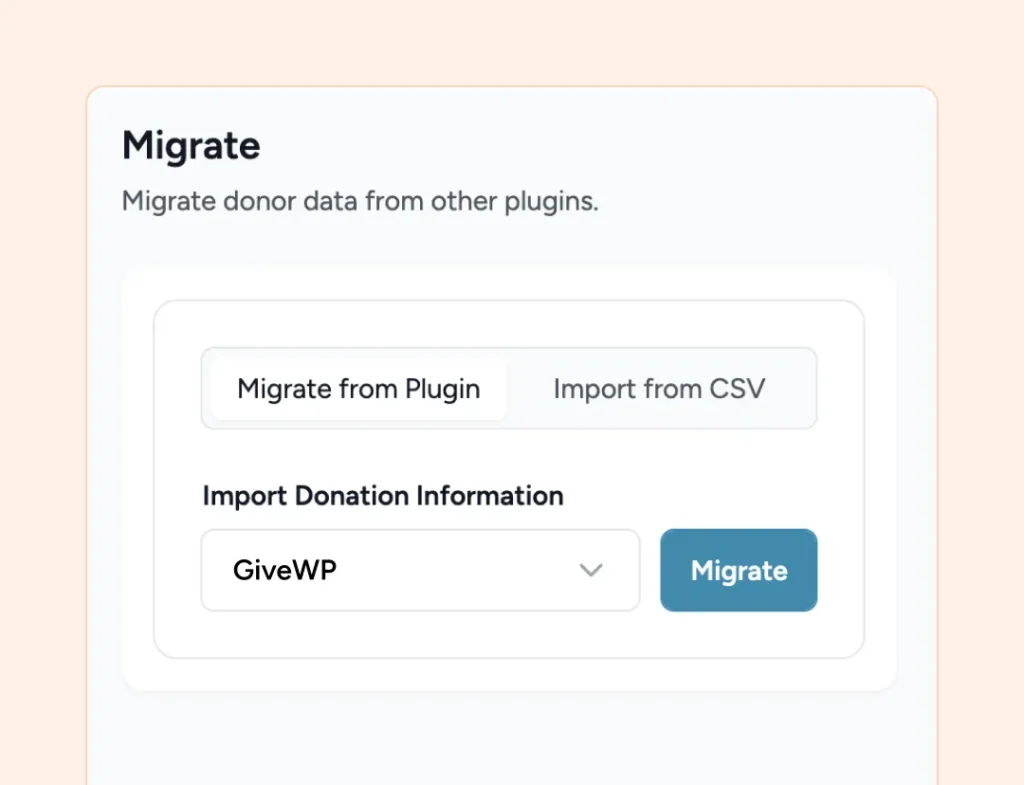
Steps
STEP 1
Install SureDonation
Keep GiveWP active for now, we’ll need it during the migration process.
STEP 2
Connect Stripe or PayPal
Authenticate your existing payment account via OAuth in SureDonation settings. No new merchant accounts needed.
STEP 3
Run the GiveWP Import Tool
Bring over your donor records, giving history, and campaign data automatically.
STEP 4
Rebuild Your Campaign Pages
Add SureDonation’s Gutenberg blocks to each page. Most teams rebuild a campaign in minutes.
STEP 5
Test With a Real Donation
Make a small live donation to confirm payments, receipts, and recurring giving all work as expected.
STEP 6
Deactivate GiveWP
Once you’re happy with everything, switch off GiveWP. There’s no forced cutover date, so do this whenever you’re ready.
Which Should You Use?
Find the right fit based on your budget and workflow.
Choose SureDonation if You:
-
Want donation forms in the Gutenberg block editor
-
Want recurring donations and fee recovery for free
-
Already use Astra, CartFlows, or SureForms
-
Want AI-assisted donor data access via MCP
-
Are building a new fundraising site from scratch
-
Are migrating off GiveWP for a faster setup
Choose GiveWP if You:
-
Need Square payments for in-person giving
-
Require Salesforce or Mailchimp integration today
-
Need peer-to-peer fundraising right now
-
Rely on 15+ international payment gateways
-
Prefer a plugin with 10+ years of history
-
Already have GiveWP workflows in place
What Our Users Say
Nonprofits and agencies share what changed after switching to SureDonation.
We needed recurring donations from day one and didn’t want to pay $400 a year for it. SureDonation’s free plan covered everything, and the Gutenberg blocks meant our campaign pages finally felt like part of our site…

Maria (@marialeads)
Nonprofit Program Director
Things you may want to know
SureDonation makes fundraising easier with a modern WordPress-native experience. Build campaigns visually, manage donors in one place, and accept secure donations without the complexity of multiple add-ons.
Most organizations with 3–5 active campaigns are fully switched over in 2–4 hours. Install SureDonation, run the import, and you’re ready to accept your first donation the same day.
No. The built-in GiveWP import tool brings over your donor records, giving history, and campaign data automatically, so nothing gets left behind.
No. Connect your existing Stripe or PayPal account via OAuth in a couple of clicks. No new merchant accounts, no gateway changes.
Rebuilding is quick, since SureDonation’s Gutenberg blocks are faster to work with than GiveWP’s form builder. Most teams recreate a campaign page in minutes, right inside the block editor.
Donor records and giving history carry over automatically with the import tool. Active recurring subscriptions are payment gateway tokens tied to GiveWP, so existing recurring donors will need to re-subscribe after migration. Most organizations send a quick email to their sustainers and see strong re-subscription rates.
Not at all. Run SureDonation alongside GiveWP, test a real donation, and switch over whenever you’re ready. There’s no forced cutover date.
Yes. Since SureDonation installs from WordPress.org and integrates naturally with Astra, agencies can migrate client sites one at a time and hand off campaign pages clients can manage themselves.
We’ve got you covered. Follow our step-by-step migration documentation to import your GiveWP campaigns, donors, and donation history into SureDonation. If you run into any issues, our support team is here to help. Check out the migration guide here: GiveWP Migration Documentation
Email [email protected] and we will point you in the right direction.