
A school parent group wants to raise money for new library books. Donations arrive through a payment link, the running total lives in a spreadsheet, and nobody is sure which donors have received a thank-you email. The money is coming in, but the fundraising is happening everywhere except the website.
That is the gap SureDonation is designed to close. SureDonation is a WordPress donation plugin that helps you create fundraising campaigns, accept donations, and manage donor records on your own website. It brings your campaign pages, donation forms, payment connections, and donor follow-up into the WordPress dashboard. It is made by Brainstorm Force, the team behind Astra, SureForms, and SureCart.
It is built for nonprofits, schools, community groups, places of worship, creators, and other organizations that already use WordPress. You can start with the free plugin, then add Pro when you need recurring giving, donor self-service, or more automation.
Here is how it works, what each version includes, how the fees work, and what to check before accepting your first donation.
Key takeaways
- SureDonation is a WordPress plugin for fundraising campaigns, donation forms, and donor records, made by Brainstorm Force.
- Free includes campaigns with goals, block editor forms, one-time Stripe and PayPal donations, offline donations, fee recovery, donor records, and CSV exports.
- Free adds a 2.9% SureDonation platform fee to Stripe and PayPal donations. An active Pro license removes it. Provider processing fees apply in both versions.
- Pro adds recurring giving, a donor dashboard, PDF receipts, Gift Aid tools, a currency switcher, multi-step forms, email integrations, Zapier, and webhooks.
- Pro is currently available through a beta access program.
Table of contents
- What is SureDonation and how does it work?
- What you get with SureDonation Free
- Is SureDonation free? Understanding the costs
- What SureDonation Pro adds
- SureDonation Free vs Pro at a glance
- How to launch your first campaign with SureDonation
- Is SureDonation a good fit for your website?
- SureDonation launch checklist
- Frequently asked questions
What is SureDonation and how does it work?
SureDonation is a WordPress donation plugin that connects a fundraising campaign, a donation form, and a payment provider such as Stripe or PayPal. Supporters read your campaign and give through the form. The payment provider processes the payment, and SureDonation records the donation and donor details in your WordPress dashboard.
What does a SureDonation campaign include?
A campaign gives supporters a place to understand your cause and make a donation. You add the story, images, fundraising goal, and donation form. SureDonation then connects that form to your selected payment method and records the donation in WordPress.
For an animal rescue, that could mean one campaign for emergency veterinary care and another for a new shelter. Each can have its own appeal and suggested amounts, while your team manages the records in the same dashboard.
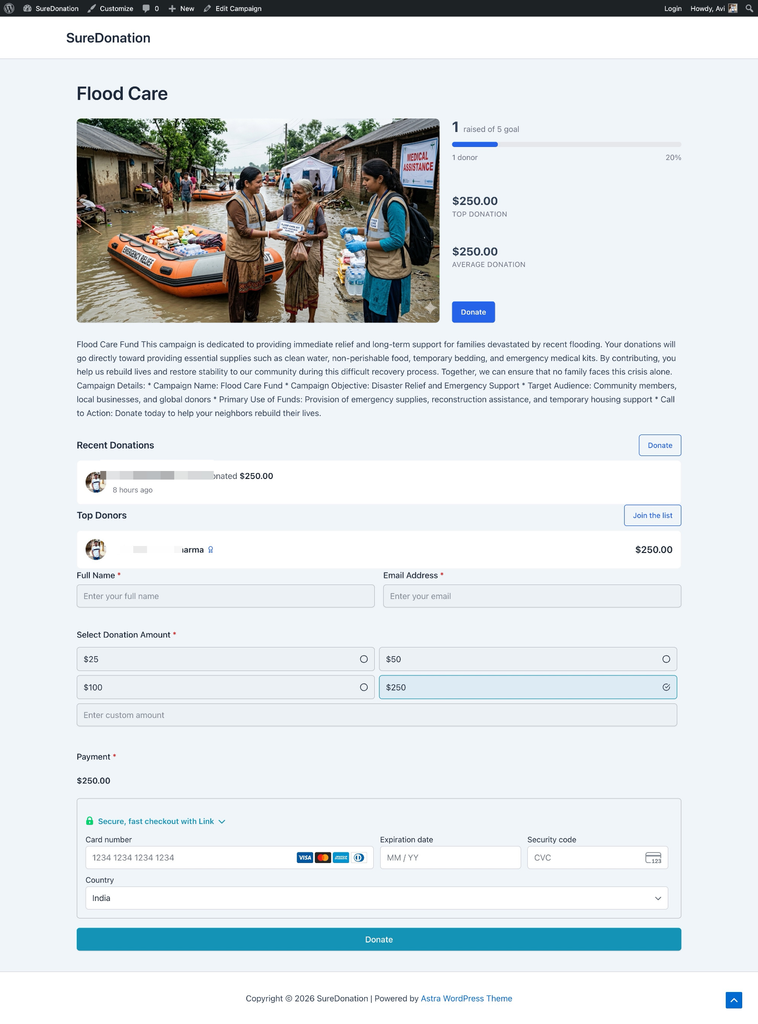
An example SureDonation campaign page brings the cause, fundraising progress, recent donations, and donation form together.
What do you need to use the SureDonation plugin?
The SureDonation plugin runs inside WordPress. You still need a WordPress website and a supported payment provider account for online payments. Stripe or PayPal processes the payment; SureDonation supplies the campaign, form, and donation-management tools around it.
What you get with SureDonation Free
SureDonation Free includes multiple campaigns with fundraising goals and progress displays, donation forms you edit in the WordPress block editor, and one-time donations through Stripe and PayPal. It also covers offline donations, optional fee recovery, admin donor records, CSV exports, confirmation emails, and a weekly donation summary.
Can you build campaigns and forms in the block editor?
Yes. You can create multiple campaigns with fundraising goals and progress displays. Start with a campaign template or build your own page, then use the WordPress block editor to adjust the donation form.
Offer preset amounts, let supporters enter a custom amount, and add short descriptions or images that explain what a gift could help fund. Keep those examples realistic for your organization. A clear description such as “helps provide school supplies” is more useful than an amount with no context.
The form builder includes fields for contact details and other information you need, along with options such as donor comments and anonymous giving. Ask only for information you will actually use. The donation amount guide and form styling guide explain the available controls.
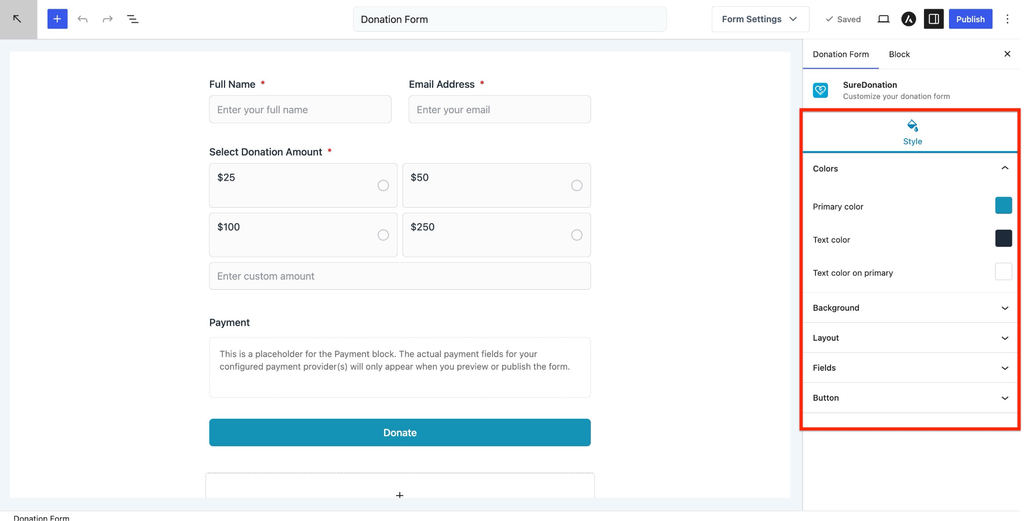
Build and style a donation form in the WordPress block editor, with a form preview beside the styling controls.
Which payment methods does SureDonation Free support?
Free supports one-time donations through Stripe and PayPal. Availability depends on your provider account, country, and selected currency.
You can also enable offline donations and show instructions for a bank transfer, check, or cash payment. An offline submission records the intended donation; it does not move the money. Confirm that you have received the funds before marking it complete.
How does SureDonation handle donor records and emails?
The admin area keeps donor information and donation history together, so you can review amounts, campaigns, dates, and payment statuses. CSV exports help you work with your records outside WordPress.
You can configure donor confirmation emails and admin notifications, personalize messages with smart tags, and receive a weekly donation summary. Test email delivery before launch so donors receive the confirmation you expect.
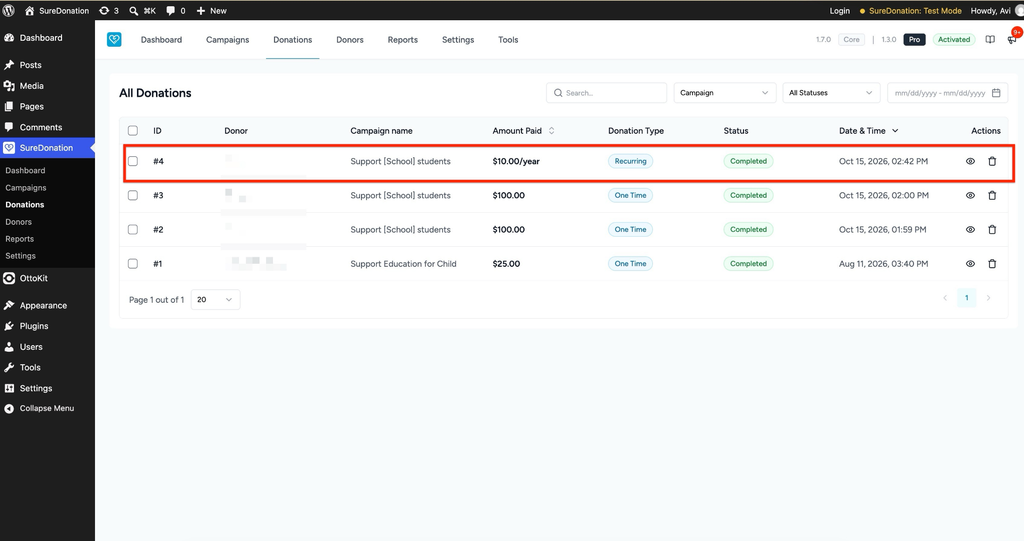
Review donations by campaign, amount, type, date, and status. This example shows one-time gifts and a Pro recurring gift in test mode.
You can set up a complete one-time campaign on Free and see how it fits your site before deciding on Pro. Install SureDonation Free from WordPress.org to start building.
Is SureDonation free? Understanding the costs
SureDonation Free is free to install, but online donations have transaction costs. Free adds a 2.9% SureDonation platform fee to donations processed through Stripe or PayPal, in addition to the payment provider’s own processing fees. An active SureDonation Pro license removes the SureDonation platform fee. Provider fees apply in both versions.
The Donation Cost Stack
Every online donation passes through up to four cost layers. Looking at them separately makes it easier to see what you control and what you don’t.
| Layer | What it is | Free | Pro (active license) |
| 1. Provider processing fee | Charged by Stripe or PayPal for processing the payment | Applies | Applies |
| 2. SureDonation platform fee | Charged on Stripe and PayPal donations | 2.9% | 0% |
| 3. Optional fee recovery | Donors can choose to contribute toward payment costs | Included | Included |
| 4. Website costs | Hosting and any other services you use | Separate | Separate |
Layer 1 and layer 4 apply whichever version you use. Layer 2 is the one your SureDonation version decides. Layer 3 is the donor’s choice.
What does the 2.9% platform fee mean in practice?
Say your campaign raises $5,000 in Stripe donations on Free. The SureDonation platform fee on that amount is $145, before Stripe’s own processing fees. With an active Pro license, the SureDonation platform fee on the same $5,000 is $0, and Stripe’s fees still apply.
As your fundraising grows, layer 2 grows with it. That is usually the point where teams compare the platform fee against the cost of Pro.
How does fee recovery work?
Both versions include optional fee recovery. You can give donors a choice to contribute toward payment costs, using a percentage and fixed amount that you configure globally or for each gateway. Use the rates that apply to your account and test the total shown on the form.
Fee recovery does not waive the provider’s fees or guarantee a particular net amount under every payment scenario. Follow the fee recovery setup guide to configure the optional contribution toward payment costs.
What SureDonation Pro adds
SureDonation Pro adds recurring giving, a donor dashboard, branded PDF receipts, and Gift Aid declaration tools. It also brings a currency switcher, multi-step forms, email marketing integrations, Zapier, webhooks, and more reporting and styling options. An active Pro license also removes the 2.9% SureDonation platform fee on Stripe and PayPal donations.
As of October 21, 2026, SureDonation Pro is available through its beta access program. Visit the Pro access page for current access details and launch updates.
How do recurring donations work in SureDonation Pro?
Pro lets you configure recurring donations with daily, weekly, monthly, or yearly billing intervals. You can offer one-time and recurring giving in the same form, with the choice beside the donation amount.
You choose the recurring interval in the form settings. For example, select monthly billing and offer both payment types to let supporters choose between a one-time gift and a monthly gift.
The recurring donations guide walks through setup and subscription management.
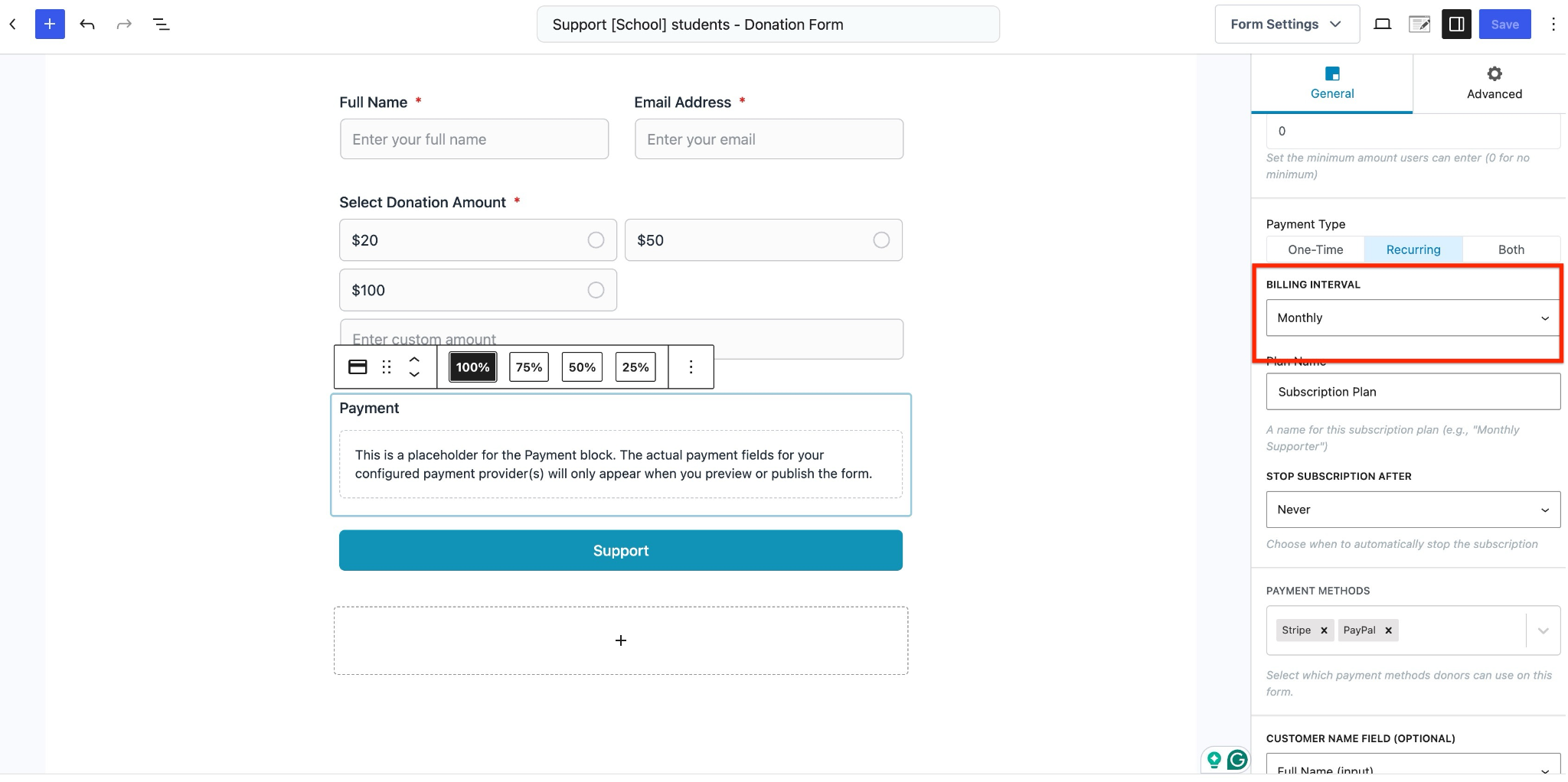
In SureDonation Pro, set the recurring billing interval in the Payment block. This example uses monthly giving.
What can donors do in the Pro donor dashboard?
The donor dashboard gives supporters a place on your website to view their donation history and manage recurring gifts. Pro also adds branded PDF receipts. Complete the PDF library setup before testing receipt generation.
Does SureDonation Pro support Gift Aid?
If you collect Gift Aid declarations, Pro provides a declaration field and export tools. Your organization remains responsible for checking eligibility and meeting the applicable requirements.
What other form and follow-up tools does Pro add?
Pro adds a currency switcher so donors can choose from the currencies you make available, plus page breaks for forms that need more than one step. Confirm that your payment provider supports the currencies you plan to offer.
Email integrations include Mailchimp, Brevo, Kit, ActiveCampaign, and MailerLite. You can configure workflows for individual forms and use conditions to decide when they run. Zapier and webhooks provide additional ways to send donation data to other tools. If a workflow subscribes donors to marketing, make the opt-in clear on the form.
Additional reporting and styling options help teams that need more control as their fundraising grows. The What’s New page shows recent releases, so you can check what is available before planning a campaign around a feature.
SureDonation Free vs Pro at a glance
SureDonation Free covers campaigns, block editor forms, one-time Stripe, PayPal, and offline donations, fee recovery, and admin donor records. Pro adds recurring donations, the donor dashboard, PDF receipts, a currency switcher, multi-step forms, and integrations, and removes the 2.9% platform fee with an active license.
| Capability | Free | Pro |
| Campaigns and block editor forms | Included | Included |
| One-time Stripe, PayPal, and offline donations | Included | Included |
| SureDonation platform fee on Stripe/PayPal | 2.9%, plus provider fees | 0% with an active license; provider fees remain |
| Optional fee recovery | Included | Included |
| Admin donor records and CSV exports | Included | Included |
| Recurring donations | Not included | Included |
| Donor dashboard and PDF receipts | Not included | Included |
| Gift Aid declaration field and exports | Not included | Included |
| Currency switcher and multi-step forms | Not included | Included |
| Email integrations, Zapier, and webhooks | Not included | Included |
The Free vs Pro page has the full comparison.
How to launch your first campaign with SureDonation
To launch your first SureDonation campaign, install the plugin and complete onboarding, finish the campaign and form, and connect Stripe or PayPal in test mode. Then test the form on the page where donors will use it, and finally verify your live payment connection before sharing the campaign.
1. Install SureDonation and complete onboarding
In WordPress, go to Plugins → Add New Plugin, search for SureDonation, then install and activate it. The onboarding wizard can help you create an initial campaign. You can also choose Configure Later and set it up from the dashboard.
If the wizard has already created a campaign, open that campaign to finish it. Create another only when you need a separate appeal.
2. Finish the campaign and donation form
Write a clear explanation of what you are raising money for, add a relevant image, and choose a realistic goal. Explain what donations will support and how you will keep supporters informed.
Edit the form’s suggested amounts, custom amount option, and required fields. Check your organization name, button text, currency, and confirmation message. If using Pro recurring giving, set the billing interval and make the donor’s choice clear.
3. Connect a payment method in test mode
Use the Stripe connection guide or PayPal connection guide to configure a test connection. PayPal uses a sandbox account for testing and a separate live connection for real donations.
Configure fee recovery if you want to offer it. Review donor and admin emails, and add clear instructions if you accept offline payments.
4. Test the form where donors will use it
Place the form on your campaign page or chosen donation page before testing the full journey. Open that page on a phone and a desktop, preferably while signed out of WordPress, and complete a test donation.
Check that:
- Preset and custom amounts work, and the currency and total are clear.
- Any fee-recovery choice changes the total as expected.
- The payment succeeds and the matching donation appears with the correct status.
- The donor confirmation and admin notification reach their intended inboxes.
- Validation messages are understandable, and the form is usable with a keyboard.
- Test donations stay out of the public campaign’s fundraising total.
For Pro, also test the recurring choice, donor dashboard, PDF receipt, and any connected workflow you intend to use.
5. Verify the live connection and launch
After testing, connect and verify your live payment account. With PayPal, changing the mode alone does not connect the live account. Make sure the live provider account is ready to accept payments, then recheck the final form and clear any relevant site cache after changing modes.
Once your test checks pass and the live account is ready, share the campaign with your audience. Monitor the first genuine donations to confirm that payment records, campaign totals, and notifications behave as expected.
Is SureDonation a good fit for your website?
SureDonation is a good fit when your website already runs on WordPress and your team wants campaign pages, forms, and donation records in the same place. Free provides the basics for one-time fundraising. Pro becomes relevant when recurring support, donor self-service, connected workflows, or removing the platform fee are part of your plan.
What should you confirm before choosing a version?
Before choosing either version, confirm that the payment methods, currencies, and integrations you need are supported. Your team will also need to maintain the WordPress website, test updates, and keep appropriate backups.
If a feature is essential to your fundraising, check its current documentation or ask SureDonation support before launch.
SureDonation launch checklist
Before you install
- Confirm your site runs on WordPress and you can install plugins.
- Confirm you have a Stripe or PayPal account that supports your country and currency.
- Decide whether you need recurring giving, a donor dashboard, or PDF receipts, which are Pro features.
- Work out what the 2.9% Free platform fee would cost on your expected donations.
- Back up your site, especially if you are migrating from GiveWP or Charitable.
Building the campaign
- Install SureDonation and complete onboarding, or choose Configure Later.
- Finish the campaign the wizard created instead of creating a duplicate.
- Write a clear explanation of what the money supports and how you will update supporters.
- Set a realistic goal.
- Add preset amounts with realistic descriptions.
- Ask only for information you will actually use.
Testing
- Connect Stripe or PayPal in test mode.
- Configure fee recovery if you want to offer it.
- Place the form on its final page before testing.
- Test on a phone and a desktop while signed out of WordPress.
- Confirm that donor and admin emails reach the right inboxes.
- Confirm that test donations stay out of the public fundraising total.
Going live
- Connect and verify the live payment account. For PayPal, changing the mode alone is not enough.
- Recheck the final form and clear your site cache.
- Share the campaign with your audience.
After launch
- Monitor the first genuine donations, totals, and notifications.
- Mark offline donations complete only after the funds arrive.
- Review the weekly donation summary.
- Keep full site backups; CSV exports are not a backup.
Frequently asked questions
What is SureDonation?
SureDonation is a WordPress donation plugin for creating fundraising campaigns, accepting donations, and managing donor records on your own website. It brings campaign pages, donation forms, payment connections, and donor follow-up into the WordPress dashboard. Stripe or PayPal processes the payments, and SureDonation provides the campaign, form, and donation-management tools around them.
Who makes SureDonation?
SureDonation is made by Brainstorm Force, the WordPress company behind Astra, SureForms, and SureCart. The free plugin is available on WordPress.org, and Pro is available through the current beta access program.
Is SureDonation free to use?
SureDonation Free is free to install. Donations processed through Stripe or PayPal on Free include a 2.9% SureDonation platform fee, in addition to the payment provider’s own processing fees. Your hosting and other services are separate costs.
Does SureDonation Pro remove the platform fee?
Yes. An active SureDonation Pro license removes the 2.9% SureDonation platform fee on Stripe and PayPal donations. Stripe or PayPal processing fees still apply. On $5,000 raised through Stripe, that is $145 in SureDonation platform fees on Free and $0 with an active Pro license, before provider fees.
Does SureDonation support recurring donations?
Yes, with SureDonation Pro. You set the billing interval in the form settings, choosing from daily, weekly, monthly, or yearly. You can offer one-time and recurring giving in the same form, so supporters choose between a one-time gift and the recurring option you configured.
Which payment methods does SureDonation support?
SureDonation supports one-time donations through Stripe and PayPal in Free, plus offline donations with your own instructions for bank transfer, check, or cash. Availability depends on your provider account, country, and selected currency. An offline submission records the intended donation but does not move the money.
Can I move from GiveWP or Charitable?
Yes. SureDonation includes migration tools for GiveWP and Charitable. Review the supported data, back up the site, and test the migration before replacing your existing setup. If you have active subscriptions, confirm the specific migration path with support. Importing records alone does not establish that future payments will continue correctly.
Does a donor need a WordPress account to give?
No. One-time donations can be made through the donation form without requiring donors to create a WordPress account. Accessing the Pro donor dashboard is a separate step for viewing and managing donations.
Are CSV exports a backup of my website?
No. CSV exports are useful copies of donation or donor records. They do not replace a full backup of your WordPress database, site files, and configuration.
How do I get SureDonation Pro?
As of October 21, 2026, SureDonation Pro is available through its beta access program. Visit the Pro access page to request access and check launch updates, then test the Pro features you need before relying on them for a live campaign.
Start your first campaign
Start with one clear appeal, a short form, and a tested payment connection. Install SureDonation Free to build your first campaign.
If recurring giving, donor self-service, or removing the 2.9% platform fee is central to your plan, request SureDonation Pro beta access and test those features before launch.
