
- Handle Custom Stripe Webhook Events
- suredonation_export_secret_option_keys Filter Hook
- suredonation_import_batch_complete Action Hook
- suredonation_import_complete Action Hook
- suredonation_import_donation_inserted Action Hook
- suredonation_import_donor_inserted Action Hook
- suredonation_import_session_created Action Hook
- suredonation_import_givewp_batch_complete Action Hook
- suredonation_import_givewp_session_created Action Hook
- suredonation_privacy_data_exported Action Hook
- Validate Field Filter Hook
- Validatable Blocks Filter Hook
- Update donation data, Filter Hook
- OttoKit Integration: suredonation_suretriggers_integration_data_filter Filter Hook
- suredonation_show_setup_gateway_notice Filter Hook
- suredonation_show_review_notice_gateway Filter Hook
- suredonation_show_review_notice_donation Filter Hook
- suredonation_registered_payment_methods Filter Hook
- suredonation_register_additional_blocks Filter Hook
- suredonation_receipt_html Filter Hook
- Validatable Blocks Filter Hook
- Update donation data, Filter Hook
- OttoKit Integration: suredonation_suretriggers_integration_data_filter Filter Hook
- suredonation_show_setup_gateway_notice Filter Hook
- suredonation_show_review_notice_gateway Filter Hook
- suredonation_show_review_notice_donation Filter Hook
- suredonation_registered_payment_methods Filter Hook
- suredonation_register_additional_blocks Filter Hook
- suredonation_receipt_html Filter Hook
- suredonation_phone_geo_enabled Filter Hook
Configuring General Settings in SureDonation
The General Settings in SureDonation allow you to configure the default currency and choose whether your donation forms process payments in Live Mode or Test Mode.
Access General Settings
To access the General Settings:
- Log in to your WordPress Dashboard.
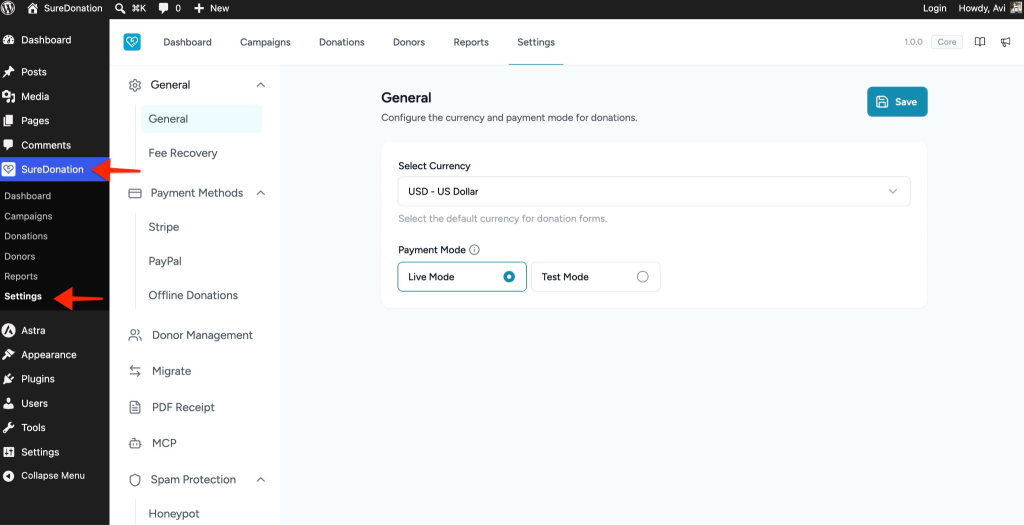
- Navigate to SureDonation > Settings.
- Open the General tab.
Configure the Default Currency
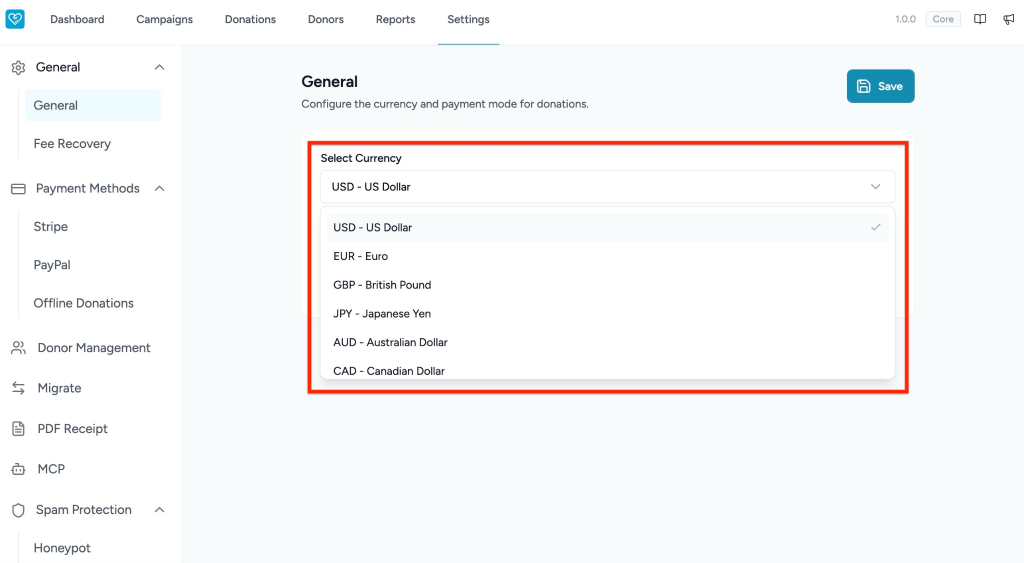
The Select Currency option lets you choose the default currency that will be used across your donation forms.
To configure the currency:
- Go to SureDonation > Settings > General.
- Locate the Select Currency dropdown.
- Click the dropdown menu.
- Choose your preferred currency.
- The selected currency will be applied as the default currency for donation forms.
Configure Payment Mode
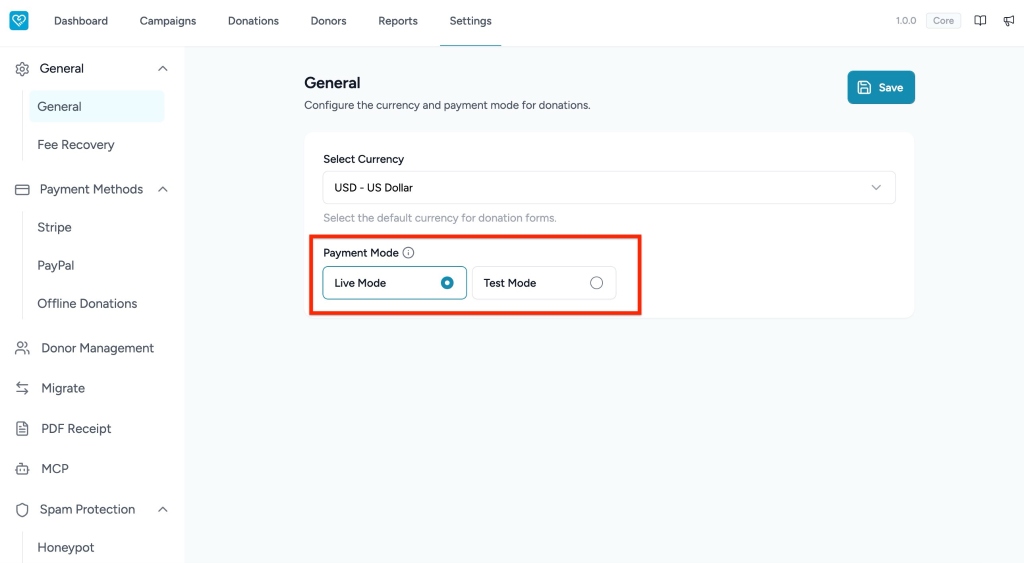
SureDonation provides two payment modes:
- Live Mode – Processes real donations using your connected payment gateway.
- Test Mode – Allows you to test donation flows without processing actual payments.
To change the payment mode:
- Navigate to SureDonation > Settings > General.
- Scroll to the Payment Mode section.
- Select one of the following:
- Live Mode – For accepting real donations.
- Test Mode – For testing and setup purposes.
- Save your changes.
Note: Use Test Mode while configuring and testing your payment gateway. Switch to Live Mode only when you are ready to accept real donations.
Was this doc helpful?
What went wrong?
We don't respond to the article feedback, we use it to improve our support content.
Table of Contents