
- Handle Custom Stripe Webhook Events
- suredonation_export_secret_option_keys Filter Hook
- suredonation_import_batch_complete Action Hook
- suredonation_import_complete Action Hook
- suredonation_import_donation_inserted Action Hook
- suredonation_import_donor_inserted Action Hook
- suredonation_import_session_created Action Hook
- suredonation_import_givewp_batch_complete Action Hook
- suredonation_import_givewp_session_created Action Hook
- suredonation_privacy_data_exported Action Hook
- Validate Field Filter Hook
- Validatable Blocks Filter Hook
- Update donation data, Filter Hook
- OttoKit Integration: suredonation_suretriggers_integration_data_filter Filter Hook
- suredonation_show_setup_gateway_notice Filter Hook
- suredonation_show_review_notice_gateway Filter Hook
- suredonation_show_review_notice_donation Filter Hook
- suredonation_registered_payment_methods Filter Hook
- suredonation_register_additional_blocks Filter Hook
- suredonation_receipt_html Filter Hook
- Validatable Blocks Filter Hook
- Update donation data, Filter Hook
- OttoKit Integration: suredonation_suretriggers_integration_data_filter Filter Hook
- suredonation_show_setup_gateway_notice Filter Hook
- suredonation_show_review_notice_gateway Filter Hook
- suredonation_show_review_notice_donation Filter Hook
- suredonation_registered_payment_methods Filter Hook
- suredonation_register_additional_blocks Filter Hook
- suredonation_receipt_html Filter Hook
- suredonation_phone_geo_enabled Filter Hook
View a SureDonation Campaign on the Frontend
The View Campaign option allows you to preview and access the public campaign page exactly as donors will see it. From this page, you can review campaign details, donation progress, recent donations, donor information, and submit donations using the attached campaign form.
How to View a Campaign
- Navigate to SureDonation > Campaigns.
- Open the campaign you want to manage.
- Click Campaign Page.
- Select View Campaign from the dropdown.
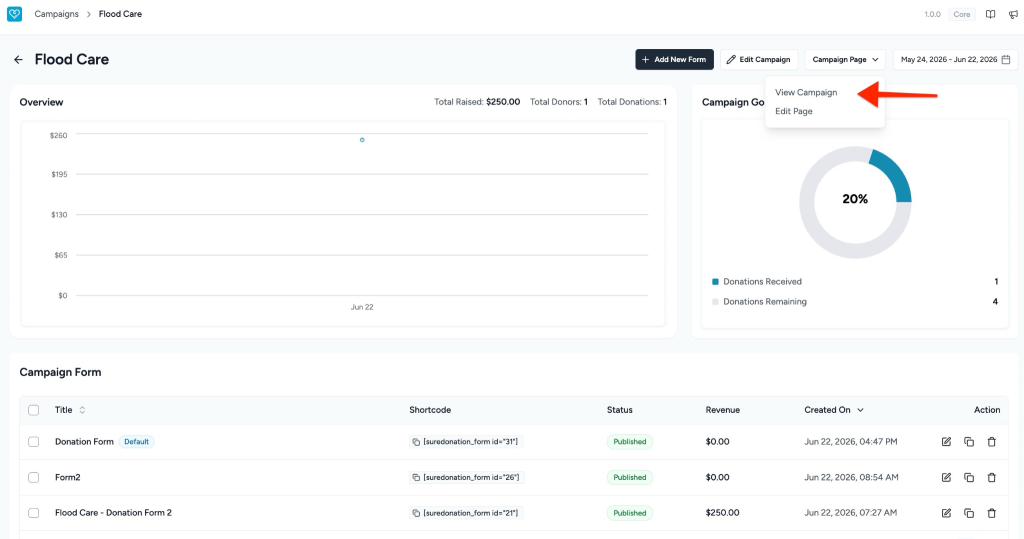
The campaign page will open on the front end of your website.
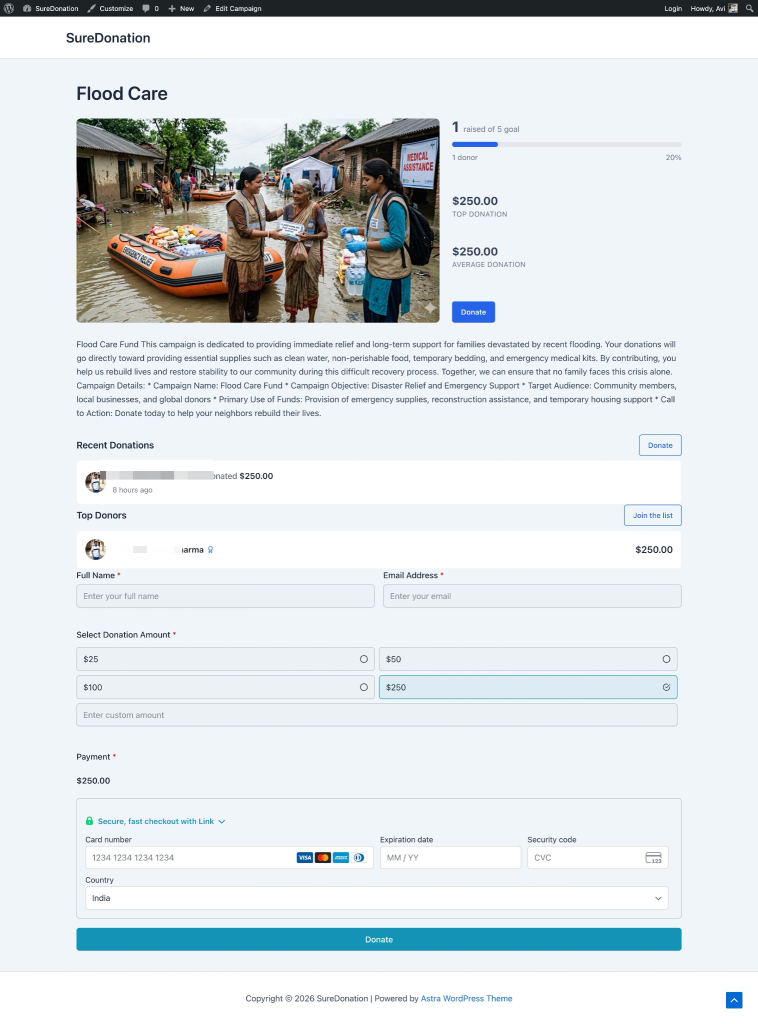
What You Can See on the Campaign Page
The campaign page displays all important campaign information for visitors and donors.
Campaign Header
Displays the campaign title.
Example: Flood Care
Campaign Progress Summary
The campaign progress section shows donation performance at a glance.
Available details include:
- Raised Goal Progress
Example: 1 raised of 5 goal - Total Donors
Example: 1 donor - Campaign Progress Percentage
Example: 20% - Top Donation
Example: $250.00 - Average Donation
Example: $250.00 - Donate Button
Allows visitors to quickly jump to the donation form.
Campaign Description
Displays the campaign content and purpose.
Example content:
Flood Care Fund
This campaign is dedicated to providing immediate relief and long-term support for families devastated by recent flooding. Donations help provide clean water, non-perishable food, temporary bedding, emergency medical kits, reconstruction assistance, and temporary housing support.
This section may also include:
- Campaign Name
- Campaign Objective
- Target Audience
- Primary Use of Funds
- Call to Action
Recent Donations
Displays recent donor activity for the campaign.
Example:
- Avinash Kumar Sharma donated $250.00
- 8 hours ago
The Donate button allows visitors to contribute directly.
Top Donors
Displays the highest contributing donors.
Example:
| Donor | Donation |
| Avinash Kumar Sharma | $250.00 |
Visitors can also click Join the list to appear in donor rankings after contributing.
Donation Form
The donation form allows visitors to submit contributions directly from the campaign page.
Default Form Fields
- Full Name*
Enter donor name. - Email Address*
Enter donor email. - Select Donation Amount*
Preset donation options:- $25
- $50
- $100
- $250
- Custom Amount
Enter a custom donation value. - Payment*
Payment section appears based on the configured payment gateway.
Example message: Complete the form to view the amount.
If test mode is enabled: Test mode is enabled: Click here to enable live mode and accept payment. - Donate Button
Completes and submits the donation.
Result
Once configured and published:
- Visitors can view campaign details.
- Donors can track fundraising progress.
- Donations appear in recent activity.
- Top donor rankings update automatically.
- Users can submit donations directly from the campaign page.
We don't respond to the article feedback, we use it to improve our support content.